Basalt Island Digital Painting Study Part 2

BasaltIsland6

I’ve added more detail to my basalt island study.

I tried different techniques to getting in the myriad imperfections on the rock face – from using a textured brush to putting on each imperfection one stroke at a time.

I found that putting on one stroke at a time gave more realistic results but was really time consuming!

Basalt Island Digital Painting Study Part 1

I wanted to learn how to paint basalt so I’m doing a basalt island study using this photo from Getty Images as a reference.

I am deliberately not using the eye dropper tool to sample colours from the photo reference but instead I’m practicing guessing the colours myself.

  1. Using the trick of starting out on a small canvas, first I painted the sky: BasaltIsland1
  2. Then I blocked-in the water: BasaltIsland2
  3. Then the basalt island: BasaltIsland3
  4. At this point I viewed the image in grayscale to check the values (brightness) of the various components: BasaltIsland4_ValueCheck
  5. This looked OK to me so I scaled the image up by 300% and started painting in more detail: BasaltIsland5_Scaled300pcent

I’m determined to be in bed by 11pm so I’m signing off now.

Dark Temple Sketches 4

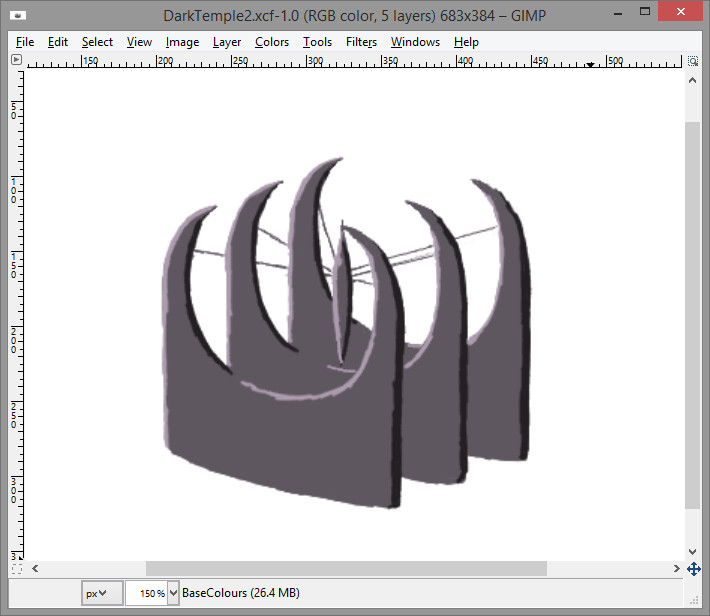
DarkTemple2_Sketches13

I tried to make the temple look like it was made of basalt (a dark volcanic rock apparently).

I experimented with a new texturing process:

  1. Using a textured brush (one of Gimp’s built-in acrylic brushes), I painted onto a separate layer.
  2. Using the eraser tool on the texture layer, I cut the texture down to fit the shape of the temple.
  3. I then switched on Lock Alpha Channel for the texture layer and painted light and dark areas with a large brush.

Not sure I like the design of the windows – I was wanting something more gothic.

Anyway I think I’ll leave this one for now and get on with some landscape studies next.

Dark Temple Sketches 3

More Dark Temple Sketching tonight.

  1. Sketching in the lines from which the central tower is suspended: DarkTemple2_Sketches8
  2. Then blocking in the base colour (the line layer is on top): DarkTemple2_Sketches9
  3. Blocking in the shadows and highlights: DarkTemple2_Sketches10
  4. Scaling the image up by 200% and then blending in the tones (I found that the best results were achieved when using the airbrush tool with a flat shaped brush and a large brush size): DarkTemple2_Sketches11

I think my perspective is a bit off here, I should have used a vanishing point somewhere off to the top right of the screen.  A note for next time.

Coming down with a cold so I’m off to put on some Vapo Rub and get an early night!

Dark Temple Sketches 2

Picking up on my last post, I’ve started a more detailed drawing of the “central suspended tower” idea.

  1. First I put in some blue construction lines and then drew in part of the temple: DarkTemple2_Sketches4
  2. I then duplicated this part twice using “Paste As New Layer” and then “Merge Down layer” in Gimp and erased a few unwanted lines: DarkTemple2_Sketches5
  3. A few more construction lines helped me to situate the central suspended tower: DarkTemple2_Sketches6
  4. I then drew in the central suspended tower: DarkTemple2_Sketches7

In an effort to keep my life in balance, I’m calling it a night now – sleep deprivation is bad.

Dark Temple Sketches

Staying with environments, my next painting will be of a dark temple.  This will be good preparation for illustrating the first panel of my digital comic.

I’m starting with a few sketches where I’ve tried to let my imagination run wild.

Out of the first 6 sketches, I’ve circled one that jumped out at me:DarkTemple2_Sketches1

I tried to follow this train of thought on with another 4 sketches:DarkTemple2_Sketches2

During the last 2 sketches I had another brain wave for the last sketch where I’ve got a tower suspended in the centre: DarkTemple2_Sketches3

Time for bed now but I reckon I’ll go with the central suspended tower.


Stone Building Digital Painting – Work In Progress 1

StoneBuilding1_11WIP

This stone building digital painting in Gimp is still a work in progress.

I’m trying to improve my skills at painting environments with stone buildings.  Very useful for doing fantastical castles and the like.

Anyway this will be my last post before Christmas so Merry Christmas everyone!